Personal data consentPrivacy policyCookie policySole proprietor Yu. E. Peklich, PSRNIE 320237500078157© 2025 MaPbiz Group. All rights reserved

A working day can easily turn into endless window switching: check traffic in Metrica, review queries in Webmaster, open advertising statistics, create tasks in Tracker and find the right document on Disk.
The data belongs to one business problem but lives in separate dashboards. People copy it manually, keep the context in their heads and then explain to the team what should be changed.
Sistemno MCP brings Yandex services into one working environment for an AI agent. It is a cross-platform application for macOS, Windows and Linux: Codex or another compatible client receives clearly defined tools and can read data, compare metrics and perform approved actions directly in a conversation.
One local server connects Tracker, Metrica, Webmaster, Direct, Wiki and Disk. Instead of six dashboards, you describe one task in plain language.
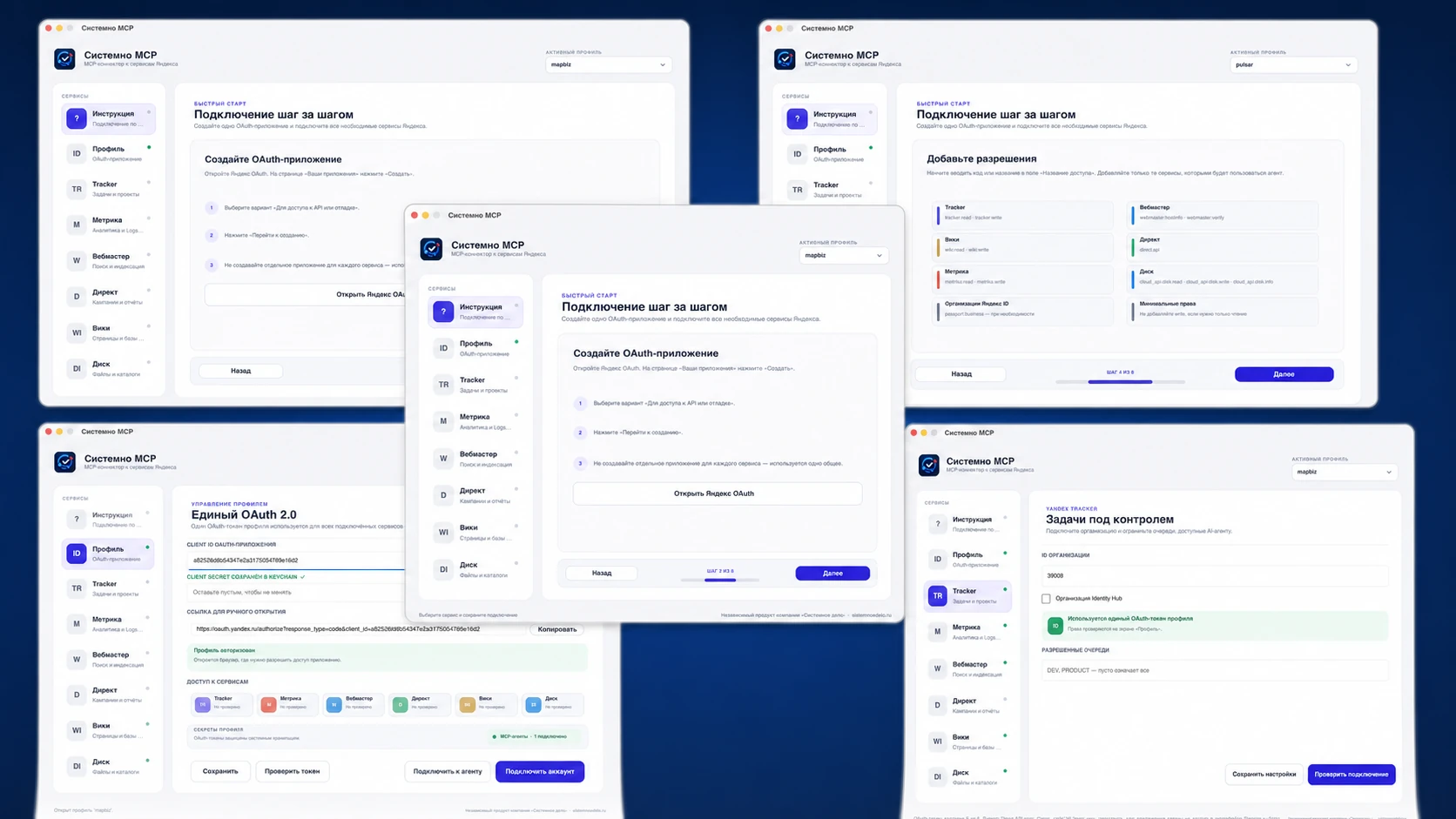
Sistemno MCP combines a macOS desktop application with a local MCP server. The interface guides users through OAuth setup, helps select permissions, tests access to every service and installs a ready-to-use profile into the chosen AI client.
There is no need to find Codex, Cursor or Claude Code configuration files and paste long commands manually. The application registers the MCP server in the user configuration, making it available across projects in that client.
You can create separate named profiles for a personal account, the company and individual clients. Data and permissions remain isolated, while the required working environment is selected before the conversation begins.
The real value appears when AI does more than read one report and starts connecting data and actions across services.
“Find queries with impressions and low CTR in Webmaster, compare them with visitor behaviour in Metrica and prepare improvement tasks in Tracker. Show me the plan before creating anything.”
In one request, the agent retrieves search data, checks real audience behaviour, formulates hypotheses and turns them into a manageable action plan. Context is not lost while copying spreadsheets, and source metrics stay connected to the conclusions.
The same approach can combine Direct advertising reports with Metrica, attach files from Disk to a task, find instructions in Wiki or prepare a batch of Tracker issues after approval.
Sistemno MCP does not isolate Yandex inside a separate chat. Its greatest value appears when the agent can also access local files, a working repository, company documents, databases or other MCP servers.
Yandex data then becomes part of a broader working context. The agent can retrieve queries from Webmaster, open local page copy and suggest precise changes. It can export Metrica statistics, compare them with an internal report and save the result inside the project folder. It can find an issue in Tracker, prepare material from available documents and attach a Disk link.
Each source remains behind its own connection and permissions. Sistemno MCP provides the Yandex tools, other connectors expose their own resources, and the AI agent combines them into one coherent workflow. There is no need to copy data manually between windows: the context and the result stay in a single conversation.

The MCP server runs on your computer. Requests go directly to official Yandex APIs and do not pass through third-party servers.
Client secrets, access tokens and refresh tokens are not stored in ordinary JSON files. On macOS, Windows and Linux, the application uses the protected credential storage provided by the operating system. Profiles remain separated, so personal, work and client accounts can be connected to the agent under clear names.
Read operations are separated from actions that modify data. Before a risky request, the agent should display the purpose and parameters of the operation. OAuth permissions can remain read-only wherever changes are unnecessary.
AI receives a specific set of tools with permissions chosen by you—not broad access to the entire computer.
Choose the build for your operating system—macOS, Windows or Linux—and complete a short setup.
After testing the connection, you can immediately ask practical questions: request a report, search tasks, analyze traffic sources or prepare changes. One OAuth profile serves all connected APIs, while the application displays the status of each service separately.
Tools can be combined. The agent might create a report, save it to Disk, add the link to a Tracker task and attach a short explanation for the team—all in one conversation.
The application supports Codex, Claude Code, Cursor, VS Code with Copilot, Windsurf, Antigravity and Cline CLI. The connection is created at user level and stays available across projects in the selected client.
Sistemno MCP is especially useful for marketers, SEO specialists, project managers, agencies and business owners. It removes routine work whenever a decision requires data from several services and the conclusions must become concrete tasks.
Agencies can create a separate profile for every client. Internal teams can isolate work and personal accounts. The agent always operates through an explicitly selected profile and its permissions.
Sistemno MCP is an independent product by Sistemno Delo, not a Yandex application. It uses the official APIs of compatible services.
The application works on all three major desktop platforms: macOS, Windows and Linux. You can keep your familiar operating system and connect an AI agent without being tied to Apple hardware.
Start with minimum OAuth permissions and one clear workflow. Ask the agent to read and compare data first, review the quality of its results, and enable modifying operations only where they deliver meaningful time savings.










Together we will define the budget and timeline. You came for a digital product — and received a brand strategy.
Next page: