Personal data consentPrivacy policyCookie policySole proprietor Yu. E. Peklich, PSRNIE 320237500078157© 2025 MaPbiz Group. All rights reserved
In one week, MaPbiz builds an operating system for the owner: an AI agent, structured company context, connected analytics and services, a dedicated server and website management tools.
This is not an AI course or a report that stays in a presentation. After implementation, the owner can prepare landing pages, publish articles, update copy and images, review search performance and run AI-assisted audits of digital marketing and sales in one working conversation.
Timeline: one week. Implementation fee: RUB 100,000.

The main outcome is not a set of installed applications, but an independent operating environment. The owner receives an AI agent that understands company context, can read approved data, prepare pages and publish changes through controlled tools.
Core accounts, the domain and the server remain under the client's control. MaPbiz configures the system and can assist through a separate protected connection.
The schedule assumes timely access to materials, payment for third-party services and account authorization by their owner.
We help install and configure ChatGPT, Codex or another suitable AI agent. If the selected service is unavailable on the current network and the company has no alternative agent, we help set up VPN access and explain safe operating practices.
Knowledge and credentials are separated from the start: working documents may live in context, while passwords, OAuth tokens and keys remain in native authorization windows, system keychains or a secret manager. Administrative passwords are never placed in AI conversations.
During interviews, we examine the business model, products, customers, sales arguments, current websites, marketing channels and team workflows. We also document the development path from an idea and approval to publication and result verification.
Instead of one huge document, we create a practical map of goals, products, audiences, tasks, stages, owners, constraints and acceptance criteria. The agent understands what must be done, for whom and how the result should be checked.
We collect information from the current website, social channels, proposals, presentations, policies, copy and interview transcripts. Duplicates are removed, contradictions are marked and knowledge is organized into connected Markdown files in a dedicated folder.
The context covers positioning, products, audiences, proof, objections, terminology, content rules, website structure and decision history. It becomes the semantic cloud and entry point for AI, so a new conversation does not require another explanation of the business.
The design system and tone of voice are documented in the same context: colors, typography, components, allowed visual patterns, vocabulary, tone, restrictions and good examples.
Sistemno MCP creates an authorized bridge between the AI agent and Yandex services. The verified setup covers Metrica, Webmaster, Direct, Disk, Wiki and Tracker. Separate profiles keep accounts, permissions and data isolated.
The agent can analyze traffic, search queries, impressions, clicks, indexing and advertising data and connect each observation to a specific page or task. Connections start in read-only mode; data-changing actions are enabled separately and require confirmation.
The CRM is connected through an available MCP server or official API. We verify compatibility, authorization options and permitted operations before implementation begins.
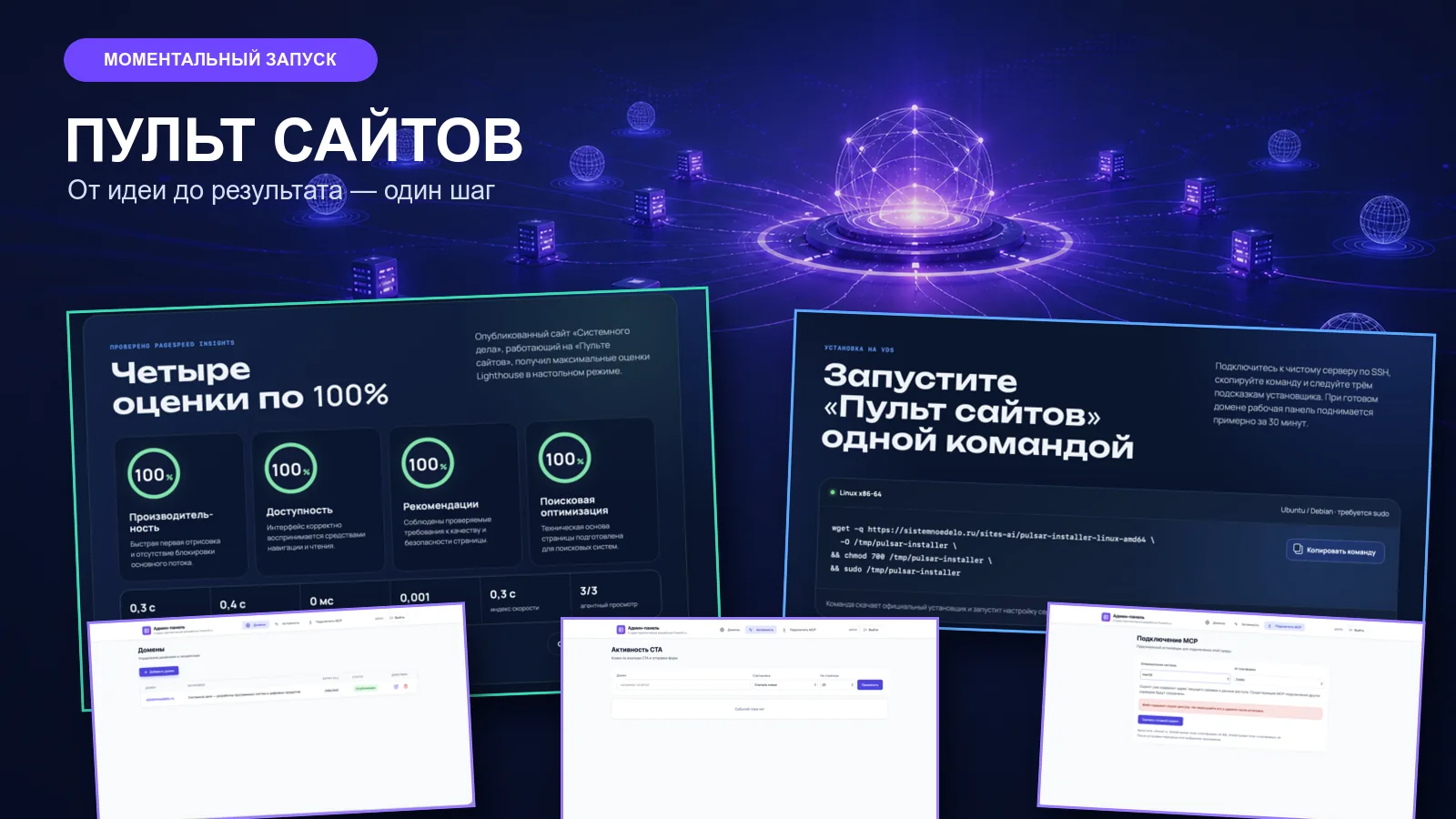
The server and domain are registered for the client, then we install Sites Console, a self-hosted system for publishing and managing static HTML, CSS and JavaScript websites from one panel and through AI agents.
The current server package includes native installation for Ubuntu/Debian Linux, system services, Traefik 3.7.10 and automatic HTTPS through Let's Encrypt. It supports multiple domains, multi-page websites, clean routes, 301/302/307/308 redirects, robots.txt, sitemap.xml, forms and a lead activity log.
Files can be read, added, replaced and moved. Updates use a temporary file and atomic switch so a failed upload does not overwrite the working version. Application upgrades back up the database and configuration and support rollback.
Sites Console includes its own MCP server over Streamable HTTP. The agent receives only approved capabilities such as viewing websites, managing domains and routes, working with files, publishing and processing leads.
The recommended connection uses OAuth 2.1 Authorization Code with PKCE. An administrator explicitly approves access, tokens have limited lifetime and the administrative password is not handed to the agent as a permanent key.
The same model can provide MaPbiz with a separate controlled connection for support and improvements. The owner keeps control of the server, domain and publication workflow.
The value comes from the complete loop: AI sees a signal in data, understands it in business context, prepares an improvement, publishes after approval and returns to analytics.
The solution is designed for companies whose sales and communication needs can be covered by static websites:
The package is not intended for complex dynamic products: large filtered catalogs, full online stores, carts, personal accounts, complex user roles or arbitrary server-side code. MaPbiz offers a different architecture and software stack for those cases.
Lead forms are supported. Payment and e-commerce workflows are outside the base digitization package and are estimated separately.
Implementation fee: RUB 100,000. Timeline: one week.
The fee covers interviews, project digitization, collection and structuring of context, AI agent setup, MCP connections, server and domain configuration, Sites Console deployment, design-system and tone-of-voice context, and hands-on training using a real page.
Third-party costs are billed separately: domain registration or renewal, server rental, AI subscription, VPN and paid plans of external services. If the CRM requires a custom integration, its cost is determined after reviewing the API and scope.
The package delivers an operating environment; it does not include producing a large corporate website from scratch or developing complex dynamic functionality.
After implementation, company knowledge is no longer scattered across unrelated files, and every website change no longer requires a new chain of contractors. The owner has one context, an AI agent and controlled tools for analysis, creation and publication.
The company can start with one website and a few clear workflows, then expand gradually by connecting more data, automating reports, adding pages and involving MaPbiz in more complex development.










Together we will define the budget and timeline. You came for a digital product — and received a brand strategy.
Next page: